среда, 20 апреля 2011 г.

Экзамен 70-599: Pro: Designing and Developing Windows Phone 7 Applications, Часть 4: Designing the Application Architecture

>>В начало

Designing the Application Architecture (21%)

  • Design for threading.
    • This objective may include but is not limited to: use of the composition thread
  • Monitor and tune performance.
    • This objective may include but is not limited to: frame rate counter; cache visualization; redraw regions; bitmap caching; memory usage limitations; plan for power consumption; tune bandwidth consumption; performance counters
  • Manage the application life cycle.
    • This objective may include but is not limited to: tombstoning; response to PhoneApplicationService events (Launching, Activated, Deactivated, Closing)
  • Prepare the application to meet Windows Phone 7 marketplace requirements.
    • This objective may include but is not limited to: Windows Phone 7 Application Certification Requirements; design for localization and globalization; plan for trial versions; work with WMAppManifest.xml; design for icon requirements for marketplace

Ссылки:

Designing the Application Architecture (21%)

RU Links:

Other links:

Video (EN):

Экзамен 70-599: Pro: Designing and Developing Windows Phone 7 Applications, Часть 3: Working with Platform APIs, Tasks, and Choosers

>>В начало

Working with Platform APIs, Tasks, and Choosers (21%)

  • Design and implement sensor interaction.
    • This objective may include but is not limited to: choose which sensors are appropriate for your application; design location awareness (when to use different levels of GeopositionAccuracy); location awareness system setting
  • Plan for and implement the use of Tasks and Choosers.
  • Plan for and implement multitouch and gestures.
    • This objective may include but is not limited to: manipulation events (ManipulationStarted, ManipulationCompleted, ManipulationDelta)
  • Design and implement application navigation.
    • This objective may include but is not limited to: pass parameters (NavigationContext API), manipulate the navigation stack (NavigationService API), use of the Back button, PhoneApplicationPage class and PhoneApplicationFrame class and the difference between these two classes

Ссылки:

Working with Platform APIs, Tasks, and Choosers (21%)

RU Links:

EN Links:

Video (EN):

Экзамен 70-599: Pro: Designing and Developing Windows Phone 7 Applications, Часть 2: Designing and Implementing Notification Strategies

>>В начало

Designing and Implementing Notification Strategies (17%)

  • Plan for and implement push notifications in the application.
    • This objective may include but is not limited to: choose method for notifying user of application’s state/status (tile, toast, RAW); respond to notifications; registration for notifications
  • Plan for and implement push notifications on the server.
    • This objective may include but is not limited to: when to use toast, tile, and raw; plan for receiving the unique device URL
  • Create and update live tiles.
    • This objective may include but is not limited to: update background image, numbers, and text

Ссылки:

Designing and Implementing Notification Strategies (17%)

RU Links: EN Links: Video (EN):

Экзамен 70-599: Pro: Designing and Developing Windows Phone 7 Applications, Часть 1: Designing Data Access Strategies

>>В начало

Designing Data Access Strategies (19%)

  • Send and receive data.
    • This objective may include but is not limited to: design connection mechanisms for communicating with external web services; plan how to consume and parse data from web services (for example, WCF and WS*); ensure a trusted transfer of data to and from a phone
  • Design a data storage strategy.
    • This objective may include but is not limited to: differentiate between persistent and transient data; determine when to use isolated storage; plan for size limitations of isolated storage; design cloud-based storage
  • Plan for bandwidth limitations and implement network connectivity detection.
    • This objective may include but is not limited to: plan for disconnected scenarios; plan for low network bandwidth

Ссылки:

Designing Data Access Strategies (19%)

RU Links: Video (EN):

Экзамен 70-599: Pro: Designing and Developing Windows Phone 7 Applications, Часть 0

Итак приступаем к подготовке к экзамену по Windows Phone 7.

Пока анонсирована только Beta версия, но к релизу экзамена, обычно, ничего не меняется.

Страница экзамена: тут.

Требования к знаниям:

Designing Data Access Strategies (19%)

  • Send and receive data.
  • Design a data storage strategy.
  • Plan for bandwidth limitations and implement network connectivity detection.

Designing and Implementing Notification Strategies (17%)

  • Plan for and implement push notifications in the application.
  • Plan for and implement push notifications on the server.
  • Create and update live tiles.

Working with Platform APIs, Tasks, and Choosers (21%)

  • Design and implement sensor interaction.
  • Plan for and implement the use of Tasks and Choosers.
  • Plan for and implement multitouch and gestures.
  • Design and implement application navigation.

Designing the Application Architecture (21%)

  • Design for threading.
  • Monitor and tune performance.
  • Manage the application life cycle.
  • Prepare the application to meet Windows Phone 7 marketplace requirements.

Designing the User Interface and User Experience (23%)

  • Design for separation of concerns.
  • Design Windows Phone 7 control usage.
  • Recommend keyboard layout for a given situation.
  • Design for system themes, accent color, and screen orientation.

Основные ссылки:

понедельник, 21 марта 2011 г.

WPF DataGrid и раскраска (выделение цветом) ячеек и строк (HOWTO)

Иногда возникает необходимость выделить цветом какие-нибудь данные в DataGrid’е. Давайте рассмотрим, как это можно сделать в WPF.
Для примера создадим класс Person
public class Person
{
    public int Id { get; set; }
    public string Name { get; set; }
    public int Age { get; set; }
}

Пишем небольшую заполнялку тестовых данных:
private List<Person> GenerateSampleData()
{
    Random r = new Random();
    List<Person> personList = new List<Person>();
    for (int i = 1; i <= 100; i++)
    {
        personList.Add(new Person { Id = i, Name = String.Format("Person Name {0}", i), Age = r.Next(60) });
    }
    return personList;
}

Кидаем на поверхность окна DataGrid и в конструкторе формы заполняем данными:
this.dataGrid1.ItemsSource = GenerateSampleData();

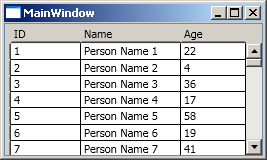
И получаем вот такую милую/унылую таблицу.


Допустим, у нас стоит задача выделить цветом те “персоны”, возраст которых не достиг 16 лет.


1.1. В определение окна добавляем ссылку на пространство имен текущего проекта

xmlns:local="clr-namespace:DataGridColor"
 

1.2. Создаем конвертер, который будет преобразовывать возраст в кисть, которой будем закрашивать фон
 
class AgeToColorConverter : IValueConverter
{
    public object Convert(object value, Type targetType, object parameter, CultureInfo culture)
    {
        // Все проверки для краткости выкинул
        return (int)value <= 16 ? 
            new SolidColorBrush(Colors.OrangeRed)
            : new SolidColorBrush(Colors.White);
    }
    public object ConvertBack(object value, Type targetType, object parameter, CultureInfo culture)
    {
        throw new Exception("The method or operation is not implemented.");
    }
}


1.3. В ресурсах окна определяем ключ конвертера
<local:AgeToColorConverter x:key="AgeToColorConverter">

1.4. И там же, в ресурсах окна, объявляем стиль, TargetType у которого будет DataGridRow.

<Style TargetType="{x:Type DataGridRow}">
    <Setter Property="Background" Value="{Binding Age, Converter={StaticResource AgeToColorConverter}}" />
</Style>

В результате получаем вот такую полосатую таблицу:


А что если нужно выделять цветом не всю строку, а только отдельные ячейки в колонке. Для примера, нужно выделить ячейки с идентификатором меньше либо равно 16.

Эта задача решается похожим способом.

2.1. Добавляем в проект еще один конвертер
class IdToColorConverter : IValueConverter
{
    public object Convert(object value, Type targetType, object parameter, CultureInfo culture)
    {
        // Все проверки для краткости выкинул
        return (int)value <= 16 ?
            new SolidColorBrush(Colors.Yellow)
            : new SolidColorBrush(Colors.Green);
    }
    public object ConvertBack(object value, Type targetType, object parameter, CultureInfo culture)
    {
        throw new Exception("The method or operation is not implemented.");
    }
}

2.2 Присваивам ключ
<local:IdToColorConverter x:Key="IdToColorConverter" />

2.3. Добавляем в ресурсы окна еще один стиль, TargetType’ом у которого является  DataGridCell. Так же стилю присваиваем ключ посредством указания x:Key="IdStyle", иначе стиль будет применен для всех ячеек во всех таблицах (а ведь нам этого не нужно).
<Style x:Key="IdStyle" TargetType="{x:Type DataGridCell}">
<Setter Property="Background" Value="{Binding Id, Converter={StaticResource IdToColorConverter}}" />
</Style> 


2.4. И для колонки, в которой хотим использовать раскраску отличную от всей строки указываем CellStyle:

<DataGridTextColumn Header="ID" Width="50" 
                    Binding="{Binding Id}" 
                    CellStyle="{StaticResource IdStyle}"/>


2.5. Если раздражает, что цвет Border’a ячейки теперь берется из цвета Background’а строки,  модифицируем стиль для ячейки устанавливая закраску Border’a белым цветом
<Style x:Key="IdStyle" TargetType="{x:Type DataGridCell}">
    <Setter Property="Background" Value="{Binding Id, Converter={StaticResource IdToColorConverter}}" />
    <Setter Property="BorderBrush"  Value="White" />
</Style>


Собственно, чтобы привлечь внимание к определенной ячейке не обязательно делать из DataGrid’а приведенного попугая, достаточно подкрашивать Border присваивая BorderBrush’у акцентирующую кисть.

Если есть вопросы – задавайте, будем разбираться вместе.

UPDATE: Если нужно раскрашивать строчки в зависимости от значений нескольких полей в таблице, то следует использовать MultiBinding и реализовывать интерфейс IMultiValueConverter. Для примера реализован вариант запрошенный io, когда нужно выделить строку, если идентификатор меньше 10 или возраст меньше 16.
Пример использования MultiBinding'а:
<Style TargetType="{x:Type DataGridRow}">
  <Setter Property="Background">
    <Setter.Value>
      <MultiBinding Converter="{StaticResource MultiBindingConverter}">
        <Binding Path="Id"/>
        <Binding Path="Age"/>
      </MultiBinding>
    </Setter.Value>
  </Setter>
</Style>

Пример реализации IMultiValueConverter'а:
    class MultiBindingConverter:IMultiValueConverter

    {
        public object Convert(object[] values, Type targetType, object parameter, System.Globalization.CultureInfo culture)
        {
            return ((int)values[0] <10 || (int)values[1]<16) ? 
                new SolidColorBrush(Colors.OrangeRed)
                : new SolidColorBrush(Colors.White);
        }

        public object[] ConvertBack(object value, Type[] targetTypes, object parameter, System.Globalization.CultureInfo culture)
        {
            throw new NotImplementedException();
        }
    }

PS. Выложил исходники.

среда, 16 марта 2011 г.

Подготовка к экзамену 70-511: TS: Windows Applications Development with Microsoft .NET Framework 4. Часть 5: Stabilizing and Releasing a Solution

>>В начало

Требования к знаниям:

  • Implement a WPF test strategy.
    This objective may include but is not limited to: automation peer, UI automation, IntelliTrace
  • Debug XAML by using the WPF Visualizer.
    This objective may include but is not limited to: accessing the Visualizer, drilling down into the visual tree, viewing and changing properties
    This objective does not include: setting a breakpoint and stepping through code
  • Debug WPF issues by using PresentationTraceSources.
    This objective may include but is not limited to: animation, data binding, dependency properties
  • Configure a ClickOnce deployment.
    This objective may include but is not limited to: configuring the installation of a WinForms, WPF, or XBAP application by using ClickOnce technology; choosing appropriate settings to manage upgrades
  • Create and configure a Windows Installer project.
    This objective may include but is not limited to: configuring a setup project to add icons during setup, setting deployment project properties, configuring conditional installation based on operating system versions, setting appropriate Launch Conditions based on the .NET Framework version, adding custom actions to a setup project, adding error-handling code to a setup project
  • Configure deployment security settings.
    This objective may include but is not limited to: configuring and integrating UAC by using ClickOnce deployments; setting appropriate security permissions to deploy the application

Ссылки на MSDN:

Статьи/Блоги:
Трассировка событий в приложении Windows Presentation Foundation
Поэтапное создание проекта установки и развертывания приложения WPF

MSDN Magazine/RU:
Поиск и устранение уязвимостей до выпуска приложения
Автоматизация тестирования пользовательского интерфейса в приложениях WPF

Video на TechDays/RU:
DependencyObject и DependencyProperty

Video на WindowsClient/EN:
Deploying a Standard WPF Application Using ClickOnce and Visual Studio
ClickOnce for Application Deployment